 Corey Smith
Sitecore - Debug Non-Public Members with Harmony


A while ago, when using reflection to call a private method on a class, I wondered, “What’s stopping us from overriding a private or static method in C#?” With Harmony, the answer is: nothing.
The Harmony library is described on GitHub:
Where other patch libraries simply allow you to replace the original method, Harmony goes one step further and gives you:
- A way to keep the original method intact
- Execute your code before and/or after the original method
- Modify the original with IL code processors
- Multiple Harmony patches co-exist and don’t conflict with each other
- Works at runtime and does not touch any files
If you’re familiar with action filters in MVC, Harmony allows you to write code that acts similarly on almost any method in a .NET app pool. You can inject code that will execute before the method or after the method; modify parameters passed into the method; modify the return value of a method; or even prevent the method from executing.
This is a library that I wish I had discovered 10 years ago when I first started Sitecore development. Anyone who’s gone on debug adventures with Sitecore knows the frustration when the method that seems to be the source of your troubles isn’t virtual or accessible through a pipeline. If only you could inspect the values in that one private method at runtime, you’d be able to understand the source of your problem. Harmony makes this possible.
Let’s look at examples of Harmony in action by intercepting some methods in Sitecore PowerShell Extensions (SPE) that you’d normally have no way to override. You certainly wouldn’t do this with assemblies shipped with Sitecore. That would be wrong, wouldn’t it?
All samples in this post can be found on GitHub: https://github.com/coreyasmith/sitecore-debug-with-harmony. The examples below are based on Harmony 2.4.3 and tested on Sitecore 10.5 with SPE 8, but they should work on any version of Sitecore 9.0+ with SPE 6.4+.
Initialize Harmony Patches
Install the Lib.Harmony NuGet package in your project.
Create a processor like this for Sitecore’s initialize pipeline:
using HarmonyLib;
using Sitecore.Diagnostics;
using Sitecore.Pipelines;

namespace CoreySmith.Foundation.SitecoreExtensions.Pipelines.Initialize
{
  public class InitializeHarmonyPatches
  {
    public void Process(PipelineArgs args)
    {
      var harmony = new Harmony("CoreySmith.Foundation.SitecoreExtensions");
      harmony.PatchAll(typeof(InitializeHarmonyPatches).Assembly);

      foreach (var method in harmony.GetPatchedMethods())
      {
        Log.Info($"[Harmony] Patched {method.DeclaringType?.FullName}.{method.Name}", this);
      }
    }
  }
}
This applies all Harmony patches in the InitializeHarmonyPatches processor’s assembly (CoreySmith.Foundation.SitecoreExtensions in this case). If you have patches in other assemblies, you could create a similar processor for those assemblies.
Patch the processor into the initialize pipeline:
<?xml version="1.0" encoding="utf-8"?>
<configuration xmlns:patch="http://www.sitecore.net/xmlconfig/">
  <sitecore>
    <pipelines>
      <initialize>
        <processor type="CoreySmith.Foundation.SitecoreExtensions.Pipelines.Initialize.InitializeHarmonyPatches, CoreySmith.Foundation.SitecoreExtensions"
                   patch:before="*[1]" />
      </initialize>
    </pipelines>
  </sitecore>
</configuration>
Time to create some sample patches.
Add Item Path to ISE Variable Tooltips
This example shows how you can use Harmony to inspect and/or override the return value of a non-public method after the method executes. Similar to the following when overriding a virtual method:
public class FooSubclass : Foo
{
  public override string Bar()
  {
    var result = base.Bar();
    return result + "!!!";
  }
}
The SPE ISE shows a useful tooltip when you mouse over variables. However, it doesn’t show the item path for Sitecore.Data.Items.Item variables. It could be useful to show [Item: /sitecore/path/to/item] at the top of the tooltip rather than just [Item].
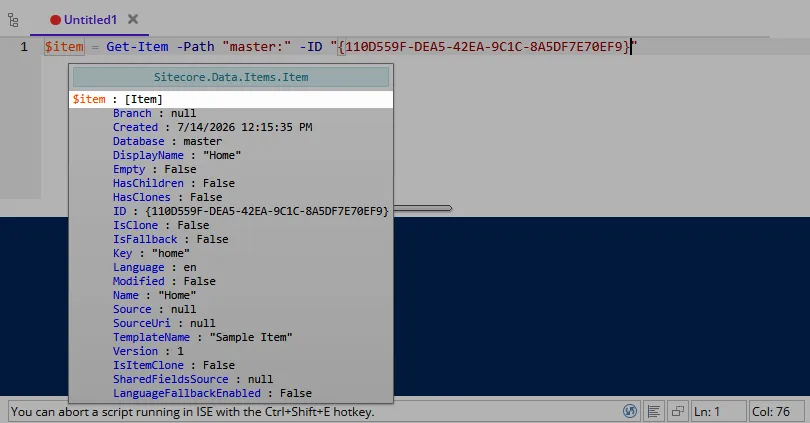
Unfortunately the GetValueString method that renders this is a private static method. Even though the GetValueString method’s class, VariableDetails, isn’t sealed, a private static method means no extension for you. But with Harmony you are unstoppable.
Create the following patch:
using HarmonyLib;
using Sitecore.Data.Items;
using Spe.Core.Debugging;

namespace CoreySmith.Foundation.SitecoreExtensions.Patches.PowerShellExtensions
{
  [HarmonyPatch(typeof(VariableDetails), "GetValueString")]
  public static class ItemVariableTooltipPatch
  {
    static void Postfix(object value, ref string __result)
    {
      if (value is Item item)
      {
        __result = $"[Item: {item.Paths.FullPath}]"; // override the original return value
      }
    }
  }
}
The HarmonyPatch attribute on the class tells Harmony which class and method are being patched. In this case, the VariableDetails class’s GetValueString method. Because GetValueString is a private method, we can’t reference it with nameof, so we pass its name as a magic string.
Inside the class, you can define a Prefix method, which runs before the method you’d like to patch, and/or a Postfix method, which runs after it.
In the Postfix method you can inspect the parameters that were passed to the method. GetValueString takes object value and bool isExpandable parameters. Here we just need value, so that’s all we declare in the Postfix signature. Harmony matches these parameters by name, so ours must be called value, the same as in GetValueString’s signature. You can declare only the parameters you need to inspect, or all of them. Up to you.
The Postfix method also gives you the opportunity to rewrite the return value of the method you’re patching. You change the return value of the method by declaring a ref parameter called __result that has the same type as the method’s return value (if you only need to read the return value, you can declare the parameter without ref). GetValueString returns a string value, so __result is typed string. In the method body, you set the __result reference parameter to the overridden value you want to return. In the example above, we set it to [Item: {item.Paths.FullPath}].
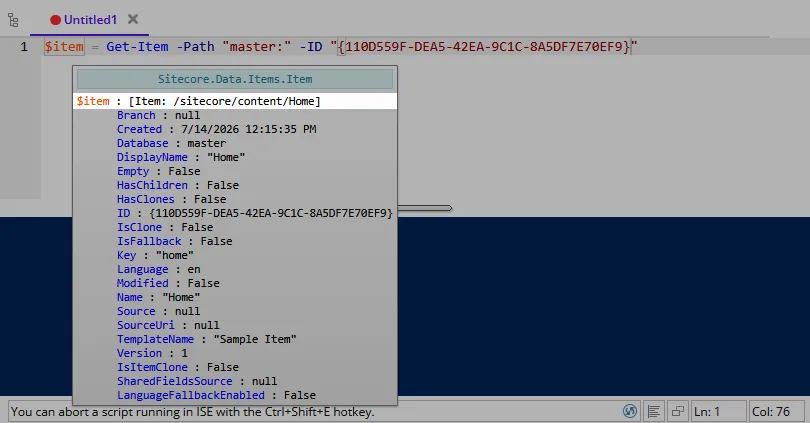
Put breakpoints in this patch and you can use the debugger to inspect any of these variables.
Evaluate All SPE Rules to True
This example shows how you can use Harmony to prevent a method from executing. Similar to the following when overriding a virtual method:
public class FooSubclass : Foo
{
  public override string Bar(string input)
  {
    if ("stop!!!" == input)
    {
      return null;
    }

    return base.Bar(input);
  }
}
Ever had an SPE script not show up in the Content Editor’s Context Menu when you expect it to? It could be useful to rule out Show Rules and Enable Rules as the reason the script isn’t showing up. You could do this by forcing all Show Rules and Enable Rules to pass.
The code that evaluates rules for SPE is a static method on a static class. No hope of overriding. Harmony empowers you.
Create the following patch:
using HarmonyLib;
using Sitecore.Rules;
using Spe.Core.Utility;

namespace CoreySmith.Foundation.SitecoreExtensions.Patches.PowerShellExtensions
{
  [HarmonyPatch(typeof(RulesUtils), nameof(RulesUtils.EvaluateRules), typeof(string), typeof(RuleContext), typeof(bool))]
  public static class ForceSpeRulesPatch
  {
    static bool Prefix(ref bool __result)
    {
      __result = true; // every Show and Enable Rule passes
      return false; // skip the original method
    }
  }
}
The HarmonyPatch attribute tells Harmony which class and method to patch. In this example, not only do we have to indicate the class name, RulesUtils, and method name, EvaluateRules, we also have to indicate the types of the method’s parameters. This method has an overload, and we are patching the one that takes string, RuleContext, and bool parameters, in that order.
This patch uses the Prefix method to intercept EvaluateRules before it executes. We want EvaluateRules to always return true. As in the example above with Postfix, you modify the return value in Prefix by declaring a ref parameter called __result that has the same type as the method’s return value. EvaluateRules returns bool, so the parameter is ref bool __result. Setting __result to true sets the return value. Return false in Prefix to tell Harmony that the original EvaluateRules method should not execute.
With this simple patch, all of SPE’s Show Rules and Enable Rules evaluate to true (with the exception of Show-ListView’s ribbon actions, which don’t apply here).
Force Strict Mode for Scripts
This example shows how you can use Harmony to modify the parameters passed to a non-public method before the method executes. Similar to the following when overriding a virtual method:
public class FooSubclass : Foo
{
  public override string Bar(string input)
  {
    var modifiedInput = input + "!!!";
    return base.Bar(modifiedInput);
  }
}
If your SPE scripts aren’t behaving as expected, strict mode can save you. Consider this script:
$item = Get-Item -Path "master:\sitecore\content"
Write-Host "Path: $($item.Path)"
This will write Path: to the console without the item’s path. This is because $item.Path is not a valid property on the item; you meant to use $item.Paths.FullPath instead.
With strict mode enabled, you would get an error:
The property 'Path' cannot be found on this object. Verify that the property exists.
At line:2 char:21
+ Write-Host "Path: $($item.Path)"
+                     ~~~~~~~~~~
    + CategoryInfo          : NotSpecified: (:) [], PropertyNotFoundException
    + FullyQualifiedErrorId : PropertyNotFoundStrict

Path:
With Harmony you can easily turn on strict mode globally. Create the following patch:
using System;
using HarmonyLib;
using Spe.Core.Host;

namespace CoreySmith.Foundation.SitecoreExtensions.Patches.PowerShellExtensions
{
  [HarmonyPatch(typeof(ScriptSession), "ExecuteScriptPart", typeof(string), typeof(bool), typeof(bool), typeof(bool))]
  public static class SpeStrictModePatch
  {
    static void Prefix(ref string script, bool internalScript)
    {
      if (internalScript || string.IsNullOrWhiteSpace(script) || script.TrimStart().StartsWith("param", StringComparison.OrdinalIgnoreCase))
      {
        return;
      }

      script = "Set-StrictMode -Version Latest; " + script;
    }
  }
}
Like the previous patch, we must specify the parameter types in the HarmonyPatch attribute due to multiple overloads of the ExecuteScriptPart method.
The ExecuteScriptPart method has a script parameter that receives the full script to execute. Any parameter that you want to modify must be declared as a reference parameter like ref string script; we are just reading internalScript and not modifying it, so it is not declared as a reference parameter.
To enable strict mode globally, modify the script parameter by prepending Set-StrictMode -Version Latest; to the first line of the script. This ensures that line numbers in error messages match the original script.
The patch doesn’t add strict mode when internalScript is true, because we only want our scripts to turn on strict mode, not SPE’s internal scripts. Empty scripts have nothing to run, so no point in strict mode for them. param() blocks must be the first statement in a script, so if we put Set-StrictMode in front of a param() block, the script’s parameters wouldn’t bind. So we also skip scripts that start with param.
Note that strict mode stays on for the rest of the session, so in the ISE, everything that runs after your first script will run in strict mode as well, including SPE’s internal scripts.
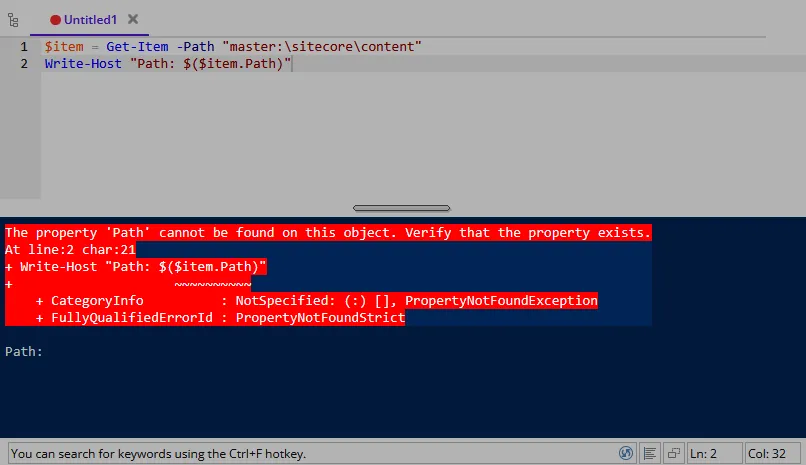
Voilà, strict mode for your SPE scripts.
Add Item Fields to ISE Variable Tooltips
This example shows how you can use Harmony to inspect and/or modify the non-public fields of the class whose method you’re patching. Similar to the following when overriding a virtual method:
public class FooSubclass : Foo
{
  public override string Bar()
  {
    // disabled is a protected field on Foo
    if (disabled)
    {
      return "Not executing when disabled is true";
    }

    return base.Bar();
  }
}
The SPE ISE tooltip that appears when you mouse over variables only shows properties of the variable type. For Item, this means things like ID, Name, DisplayName, TemplateName, and Version. But the tooltip does not render item fields because they are accessed through the Item’s Fields property. It might be convenient to see some or all field values in the tooltip.
To do this, you must get the item from the private field valueObject on the VariableDetails class and append its fields to the return value of the GetChildren method. Child’s play for Harmony:
using System;
using System.Linq;
using HarmonyLib;
using Sitecore.Data.Items;
using Spe.Core.Debugging;

namespace CoreySmith.Foundation.SitecoreExtensions.Patches.PowerShellExtensions
{
  [HarmonyPatch(typeof(VariableDetails), nameof(VariableDetails.GetChildren), new Type[0])]
  public static class ItemFieldsTooltipPatch
  {
    static void Postfix(object ___valueObject, ref VariableDetailsBase[] __result)
    {
      if (!(___valueObject is Item item))
      {
        return;
      }

      item.Fields.ReadAll();
      var fields = item.Fields
        .Where(field => !field.Name.StartsWith("__", StringComparison.Ordinal))
        .Select(field => new VariableDetails(field.Name, field.Value));

      __result = __result.Concat(fields).ToArray();
    }
  }
}
Like the previous examples, the HarmonyPatch attribute tells Harmony to patch the GetChildren method on the VariableDetails class. The third argument to the HarmonyPatch attribute, new Type[0], tells Harmony to patch the GetChildren() overload with no parameters. The VariableDetails class also has a private static GetChildren method that takes three parameters, which isn’t the one we’re targeting.
In the Prefix and Postfix methods you can access the class’s fields as method parameters. You just prefix the field’s name with ___ (three underscores) and type the parameter appropriately. Even though we’re not doing it in this sample, if you declare the parameter as a reference parameter (e.g., ref object ___valueObject), you can change its value just like we did with the script parameter in the previous example.
In this example, we check whether valueObject is an Item, and if it is, append the item’s non-standard fields to the return value of the GetChildren method.
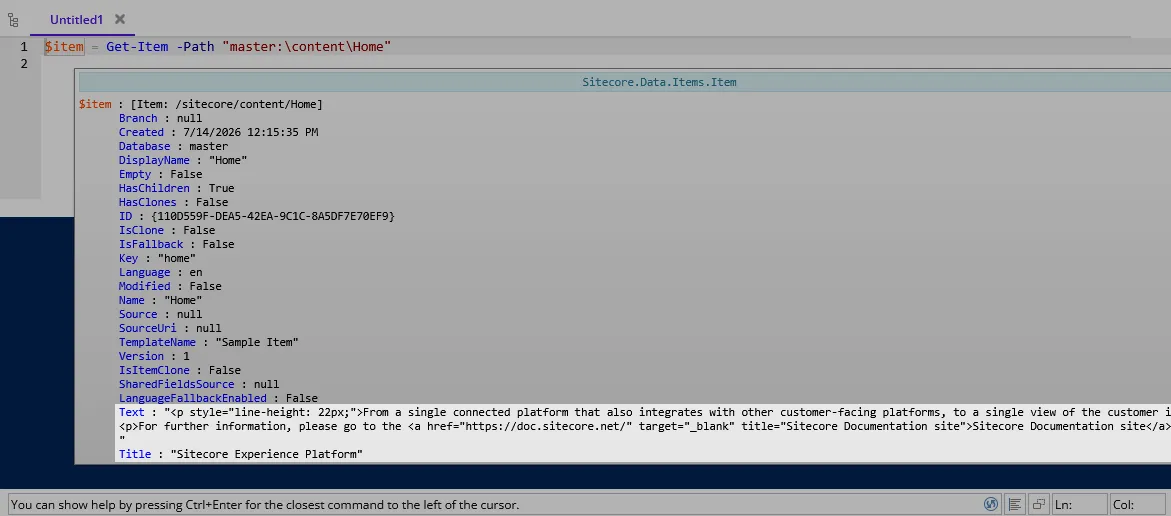
Notice that the item path is still visible in the first line of the tooltip. Multiple Harmony patches can be active at the same time—no issues.
Put breakpoints in this patch and you can use the debugger to inspect private fields on the VariableDetails class.
Log Slow Gutter Scripts
This example shows how you can pass data between Harmony’s Prefix and Postfix methods. Similar to the following when overriding a virtual method:
public class FooSubclass : Foo
{
  public override string Bar()
  {
    var sw = Stopwatch.StartNew();
    var result = base.Bar();
    sw.Stop();
    return result + " " + sw.ElapsedMilliseconds;
  }
}
Slow gutters can kill the Content Editor. It would be useful to log slow-running gutters that you build with SPE.
To do this, you need to start a stopwatch before SPE runs a gutter script, and log the runtime after the script executes. The method that runs gutter scripts, RunGutterScript on the GutterStatusRenderer class, is a private method, so it’s not extendable. But easy peasy with Harmony:
using System.Diagnostics;
using HarmonyLib;
using Sitecore.Data.Items;
using Spe.Core.Diagnostics;
using Spe.Integrations.Gutters;

namespace CoreySmith.Foundation.SitecoreExtensions.Patches.PowerShellExtensions
{
  [HarmonyPatch(typeof(GutterStatusRenderer), "RunGutterScript")]
  public static class SpeGutterTimingPatch
  {
    static void Prefix(out Stopwatch __state)
    {
      __state = Stopwatch.StartNew();
    }

    static void Postfix(Item contextItem, Item scriptItem, Stopwatch __state)
    {
      __state.Stop();
      if (__state.ElapsedMilliseconds >= 50)
      {
        PowerShellLog.Warn($"[Gutter] {scriptItem.Paths.FullPath} took {__state.ElapsedMilliseconds} ms for {contextItem.Paths.FullPath}");
      }
    }
  }
}
Like the previous examples, the HarmonyPatch attribute tells Harmony to patch the RunGutterScript method on the GutterStatusRenderer class.
The trick with this sample is the __state parameter. __state is a special parameter that is available to both Prefix and Postfix. You declare it as an out parameter on Prefix, and its value will be passed to Postfix. It can be of any type, and if you need to pass more than one value between the methods, you will need to define a class to hold them, or use something like Tuple. __state is unique to each method run; it is not shared across runs. Don’t try to share state between Prefix and Postfix by declaring static members on your patch class—these would be shared across all method runs, which is likely not what you want.
In this example, we define out Stopwatch __state on the Prefix method, start the stopwatch, and then read its elapsed time in Postfix to log gutter scripts with a runtime of 50 ms or more to the SPE log.
Debug Scripted Data Sources
This example shows how you can use Harmony to replace a single method call inside another method. There’s no equivalent to this when overriding a virtual method.
SPE’s Scripted Data Sources feature is really nice. But if your script accidentally returns objects other than Items (e.g., IDs), you’ll get an empty or incomplete list with no indication why. For example, if you had a script like Get-ChildItem master:\content\Home | ForEach-Object { $_.ID } and you referenced this script in a Droplink’s source as script:/sitecore/system/Modules/PowerShell/Script Library/X-Demo/Data Sources/Get-GlobalOption, the list would be empty. This can take time to diagnose.
Scripted Data Sources are resolved by the protected static method RunEnumeration on the abstract class BaseScriptedDataSource. Specifically, the .Where(i => i is Item) call on line 67 is what causes the list to be empty if no Items are returned by the script. We can use Harmony to inspect the script’s output before the .Where filter runs, and write a warning to the SPE log if any of the objects it returned aren’t Items, along with their types. Check it out:
using System.Collections.Generic;
using System.Linq;
using HarmonyLib;
using Sitecore.Data.Items;
using Spe.Core.Diagnostics;
using Spe.Core.Host;
using Spe.Integrations.Processors;

namespace CoreySmith.Foundation.SitecoreExtensions.Patches.PowerShellExtensions
{
  [HarmonyPatch(typeof(BaseScriptedDataSource), "RunEnumeration")]
  public static class SpeDataSourceOutputPatch
  {
    static IEnumerable<CodeInstruction> Transpiler(IEnumerable<CodeInstruction> instructions)
    {
      return instructions.MethodReplacer(
        AccessTools.Method(typeof(ScriptSession), nameof(ScriptSession.ExecuteScriptPart), new[] { typeof(Item), typeof(bool) }),
        AccessTools.Method(typeof(SpeDataSourceOutputPatch), nameof(ExecuteScriptPart)));
    }

    static List<object> ExecuteScriptPart(ScriptSession session, Item scriptItem, bool stringOutput)
    {
      var output = session.ExecuteScriptPart(scriptItem, stringOutput);
      var items = output.OfType<Item>().Count();
      if (items != output.Count)
      {
        var dropped = output.Where(result => !(result is Item)).Select(result => result?.GetType().Name ?? "null");
        PowerShellLog.Warn($"[DataSource] {scriptItem.Paths.FullPath} returned {output.Count} object(s) but only {items} Item(s); dropped: {string.Join(", ", dropped)}");
      }
      return output;
    }
  }
}
Like the other examples, the HarmonyPatch attribute tells Harmony to patch the RunEnumeration method on the BaseScriptedDataSource class.
The Transpiler method above replaces the method call. In this case, we are replacing calls to the ExecuteScriptPart(Item scriptItem, bool stringOutput) method on the ScriptSession class (line 17 above) with calls to our own ExecuteScriptPart method (line 21 above). Note that we are not replacing all ExecuteScriptPart calls in SPE, only the calls in BaseScriptedDataSource’s RunEnumeration method. You can’t get this specific with normal method overrides!
The ExecuteScriptPart method on line 21 takes ScriptSession session as its first parameter because the ScriptSession instance the original call was made on is passed in as the first argument, just like the this parameter of an extension method. In our implementation, we run session.ExecuteScriptPart as normal (as if we were calling base.ExecuteScriptPart or even decorating ScriptSession’s ExecuteScriptPart method). We then count the number of Items in the result of ExecuteScriptPart. If the number of Items returned by the script does not match the total output, then we write a warning to the SPE log. And we return the output unchanged.
Think about what we just did here. We replaced a single method call inside a protected static method. You can’t do this with reflection. Super cool.
Conclusion
Harmony is one of the coolest things I’ve found in a while. As I mentioned before, I wish I had discovered this 10 years ago. It would have saved me so much time. And I could have solved some issues that I had to give up on after hitting a roadblock that Harmony would’ve helped me plow through.
I specifically named this blog post “Debug Non-Public Members with Harmony” because I think Harmony is a powerful tool for debugging code that you couldn’t normally debug. But I don’t think I’d ever use this to patch something in Sitecore and deploy it to production. Maybe. If I came across a case where I needed to copy a 10,000-line class to fix a single line, and a Harmony patch could do the same thing with just 5 lines of code, maybe I’d change my mind. Maybe. But I don’t feel comfortable condoning that.
But you’re an adult (I assume). If Harmony helps you debug some issues, or if you’re wild enough to deploy a Harmony patch to production, share your experience in the comments or reach out to me directly. I’d love to hear about it. Happy debugging and patching!