 Corey Smith
Sitecore xConnect - Diagnose and Fix InvalidTypeMappingException Errors

I ran into an issue where the xDB Processing Pools database was stuck at 100% usage and the Sitecore Content Management server logs were filled with InvalidTypeMappingException errors like this:
ERROR [Path Analyzer] Error during aggregation.
Exception: Sitecore.Marketing.Taxonomy.Mapping.InvalidTypeMappingException
Message: Invalid mapping between types '{3BA3D006-1648-4CC7-8D19-FFADFDC46D0F}' and '{3B4FDE65-16A8-491D-BF15-99CE83CF3506}'.
 Source: Sitecore.Marketing.Taxonomy
   at Sitecore.Marketing.Taxonomy.Mapping.AbstractMapper`1.Map(TaxonEntity source)
   at Sitecore.Marketing.Taxonomy.Mapping.AbstractMapper`1.Sitecore.Marketing.Taxonomy.Mapping.IMapper.Map(TaxonEntity source)
   at Sitecore.Marketing.Taxonomy.Mapping.TaxonomyTypeMapper.Map[T](TaxonEntity data)
   at Sitecore.Marketing.Taxonomy.TaxonomyManager.Get[T](Guid taxonomyId, CultureInfo culture)
   at Sitecore.Marketing.Taxonomy.ChannelTaxonomyManager.GetChannel(Guid channelId, CultureInfo culture)
   at Sitecore.PathAnalyzer.Construction.ExperienceTreeBuilder.BuildSequence(Interaction interaction, IEnumerable`1 filteredPages)
   at Sitecore.PathAnalyzer.Construction.TreeBuilder.Build(Interaction interaction)
   at Sitecore.PathAnalyzer.Processing.AggregationContextCollector.Collect(Interaction interaction)
   at Sitecore.PathAnalyzer.Processing.TreeAggregator.Aggregate(ItemBatch`1 batch)
   at Sitecore.PathAnalyzer.Processing.Agents.TreeAggregatorAgent.Execute()
It wasn’t easy to track down the cause of this error, so in this blog post I’ll walk through the fix and how to find the root cause should you run into a similar problem.
The Fix
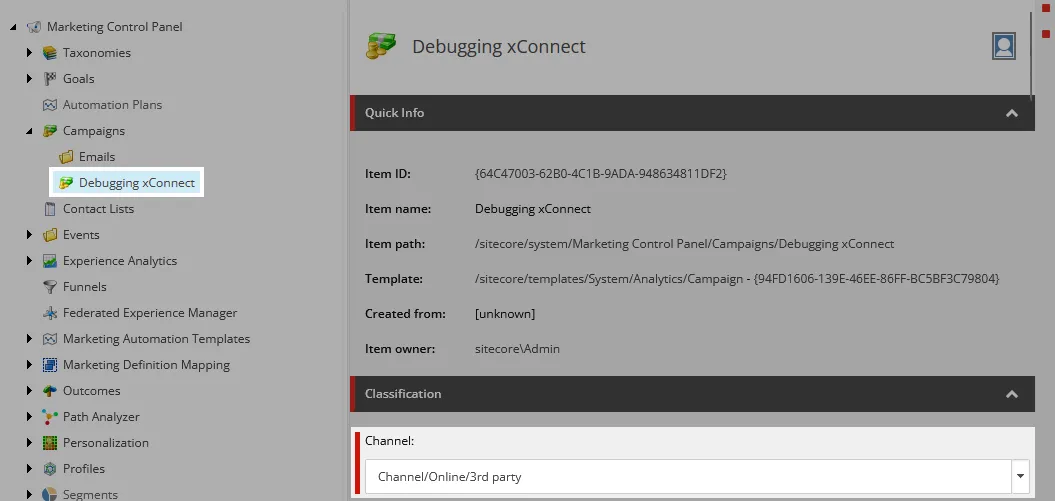
In my case, the Channel field on a Campaign was somehow set to a Channel group item instead of a Channel item as pictured below.
I have no idea how this happened. The validator on the Channel field won’t let you save a Campaign if you select something other than a Channel item. This is a mystery that won’t be solved. And it’s also not the point of this post.
To stop new errors from being created:
- Set the
Channelfield on the Campaign to aChannelitem. - Publish the Campaign.
- Deploy the Campaign definitions from the Deploy marketing definitions menu in the Sitecore Control Panel.
This will stop new Interactions from being created with the incorrect Channel item.
To fix the existing errors, update Interactions in the xDB Collection databases with the ID of the Channel item set on the Campaign. Query every shard (by default there are two, Shard0 and Shard1, but your instance may have more) to find Interactions with the invalid Channel item’s ID. In my case the ID was {26BB792E-9067-4830-8C15-2F0E3C24F500} (/sitecore/system/Marketing Control Panel/Taxonomies/Channel/Online/3rd party):
SELECT *
  FROM [Xdb.Collection.Shard0].[xdb_collection].[Interactions]
 WHERE [ChannelId] = '26BB792E-9067-4830-8C15-2F0E3C24F500' -- leave off curly braces

SELECT *
  FROM [Xdb.Collection.Shard1].[xdb_collection].[Interactions]
 WHERE [ChannelId] = '26BB792E-9067-4830-8C15-2F0E3C24F500' -- leave off curly braces
Then update the Interactions in every shard with the correct Channel item ID. In my case, the correct Channel ID was {ADA3552B-264F-4B5F-BDEF-73463AF33290} (/sitecore/system/Marketing Control Panel/Taxonomies/Channel/Online/3rd party/Email inclusion):
UPDATE [Xdb.Collection.Shard0].[xdb_collection].[Interactions]
   SET [ChannelId] = 'ADA3552B-264F-4B5F-BDEF-73463AF33290' -- leave off curly braces
 WHERE [ChannelId] = '26BB792E-9067-4830-8C15-2F0E3C24F500' -- leave off curly braces

UPDATE [Xdb.Collection.Shard0].[xdb_collection].[Interactions]
   SET [ChannelId] = 'ADA3552B-264F-4B5F-BDEF-73463AF33290' -- leave off curly braces
 WHERE [ChannelId] = '26BB792E-9067-4830-8C15-2F0E3C24F500' -- leave off curly braces
After updating all of the Interactions with the correct Channel item ID, Sitecore should stop logging InvalidTypeMappingException exceptions.
When Sitecore is trying to process these invalid Interactions, the xDB Processing Pools database can experience high sustained CPU utilization. This is caused by the GenericProcessingPool table getting filled with entries. Sitecore will get stuck trying to process the invalid Interactions, and more tasks will pile up in the database. After the invalid Interactions are fixed, Sitecore will work through the backlog, the GenericProcessingPool table should clear out, and resource usage should return to normal levels.
If after a few days the GenericProcessingPool table does not clear out, you may need to manually clear the table. Sitecore MVP Jason MacLean wrote a great blog post on this process. To recap his blog post, look in the GenericProcessingPool and InteractionHistoryProcessingPool tables for entries where Attempts > 1:
SELECT * FROM [Processing.Pools][xdb_processing_pools].[GenericProcessingPool]
 WHERE [Attempts] > 1

SELECT * FROM [Processing.Pools][xdb_processing_pools].[InteractionHistoryProcessingPool]
 WHERE [Attempts] > 1
Use your judgment to determine which ones to delete. Watch these tables closely over a few days and observe rows that are not making progress. Rows that are stuck will be good candidates for deletion. As Jason pointed out in his blog post, you’re most likely going to be deleting any rows stuck at more than 32,000 attempts.
Diagnosing the Issue
The error message in the Sitecore CM logs gives some clues as to the root cause of the issue.
Exception: Sitecore.Marketing.Taxonomy.Mapping.InvalidTypeMappingException
Message: Invalid mapping between types '{3BA3D006-1648-4CC7-8D19-FFADFDC46D0F}' and '{3B4FDE65-16A8-491D-BF15-99CE83CF3506}'.
In Sitecore, ID {3BA3D006-1648-4CC7-8D19-FFADFDC46D0F} is /sitecore/templates/System/Analytics/Marketing Taxonomy/Channel/Channel group and {3B4FDE65-16A8-491D-BF15-99CE83CF3506} is /sitecore/templates/System/Analytics/Marketing Taxonomy/Channel/Channel. The error indicates that Sitecore is unable to map a Channel group to Channel. Although this error doesn’t tell us the root cause, it’s useful to know that a map to Channel operation is failing.
The stack trace for the error is filled with a lot of generic mapper types, but this one stands out:
at Sitecore.Marketing.Taxonomy.ChannelTaxonomyManager.GetChannel(Guid channelId, CultureInfo culture)
The fact that the error is bubbling up through the ChannelTaxonomyManager is another red flag that something is going wrong with Channel items. The ChannelTaxonomyManager type is registered as a service with the dependency injection container in Sitecore config.
Near the service registration of the ChannelTaxonomyManager type in the Sitecore config is a list of Channel mappers that correspond to the abstract mappers in the stack trace:
<!-- Channel mappers -->
<register serviceType="Sitecore.Marketing.Taxonomy.Mapping.IMapper, Sitecore.Marketing.Taxonomy" implementationType="Sitecore.Marketing.Taxonomy.Mapping.Channel.ChannelTaxonomyMapper, Sitecore.Marketing.Taxonomy" lifetime="Singleton" patch:source="Sitecore.Marketing.Taxonomy.config"/>
<register serviceType="Sitecore.Marketing.Taxonomy.Mapping.IMapper, Sitecore.Marketing.Taxonomy" implementationType="Sitecore.Marketing.Taxonomy.Mapping.Channel.ChannelTypeMapper, Sitecore.Marketing.Taxonomy" lifetime="Singleton" patch:source="Sitecore.Marketing.Taxonomy.config"/>
<register serviceType="Sitecore.Marketing.Taxonomy.Mapping.IMapper, Sitecore.Marketing.Taxonomy" implementationType="Sitecore.Marketing.Taxonomy.Mapping.Channel.ChannelGroupMapper, Sitecore.Marketing.Taxonomy" lifetime="Singleton" patch:source="Sitecore.Marketing.Taxonomy.config"/>
<register serviceType="Sitecore.Marketing.Taxonomy.Mapping.IMapper, Sitecore.Marketing.Taxonomy" implementationType="Sitecore.Marketing.Taxonomy.Mapping.Channel.ChannelMapper, Sitecore.Marketing.Taxonomy" lifetime="Singleton" patch:source="Sitecore.Marketing.Taxonomy.config"/>
These mappers are overridable and they’re throwing the exception in the stack trace, so they can possibly provide more detail about the actual issue.
Add the Sitecore.Marketing.Taxonomy NuGet package to your solution and create a custom implementation of each of the above types like the DebugChannelMapper below. For brevity, I’m only showing the implementation of the DebugChannelMapper, but the implementation for the other mappers is almost identical.
using System;
using Sitecore.Marketing.Taxonomy.Data.Entities;
using Sitecore.Marketing.Taxonomy.Mapping.Channel;
using Sitecore.Marketing.Taxonomy.Model.Channel;

namespace CoreySmith.Debug
{
  public class DebugChannelMapper : ChannelMapper
  {
    public override Sitecore.Marketing.Taxonomy.Model.Channel.Channel Map(TaxonEntity source)
    {
      try
      {
        return base.Map(source);
      }
      catch (Exception ex)
      {
        throw new Exception($"Failed to map entity: {source.Id}.", ex);
      }
    }
  }
}
This debug mapper grabs the ID of the source item that the mapper is processing and adds it into the Exception that will be throw on the Sitecore CM server. This will give us the Item ID of the Channel group item that has template ID {3BA3D006-1648-4CC7-8D19-FFADFDC46D0F} mentioned in the exception:
ERROR [Path Analyzer] Error during aggregation.
Exception: Sitecore.Marketing.Taxonomy.Mapping.InvalidTypeMappingException
Message: Invalid mapping between types '{3BA3D006-1648-4CC7-8D19-FFADFDC46D0F}' and '{3B4FDE65-16A8-491D-BF15-99CE83CF3506}'.
Create a config patch to replace the service registrations for the Channel mappers with the custom implementations in Sitecore config:
<?xml version="1.0" encoding="utf-8" ?>
<configuration xmlns:patch="http://www.sitecore.net/xmlconfig/"
  xmlns:role="http://www.sitecore.net/xmlconfig/role/">
  <sitecore role:require="Standalone or ContentManagement">
    <services>
      <register implementationType="Sitecore.Marketing.Taxonomy.Mapping.Channel.ChannelTaxonomyMapper, Sitecore.Marketing.Taxonomy">
        <patch:attribute name="implementationType">CoreySmith.Debug.DebugChannelTaxonomyMapper, CoreySmith.Debug</patch:attribute>
      </register>
      <register implementationType="Sitecore.Marketing.Taxonomy.Mapping.Channel.ChannelTypeMapper, Sitecore.Marketing.Taxonomy">
        <patch:attribute name="implementationType">CoreySmith.Debug.DebugChannelTypeMapper, CoreySmith.Debug</patch:attribute>
      </register>
      <register implementationType="Sitecore.Marketing.Taxonomy.Mapping.Channel.ChannelGroupMapper, Sitecore.Marketing.Taxonomy">
        <patch:attribute name="implementationType">CoreySmith.Debug.DebugChannelGroupMapper, CoreySmith.Debug</patch:attribute>
      </register>
      <register implementationType="Sitecore.Marketing.Taxonomy.Mapping.Channel.ChannelMapper, Sitecore.Marketing.Taxonomy">
        <patch:attribute name="implementationType">CoreySmith.Debug.DebugChannelMapper, CoreySmith.Debug</patch:attribute>
      </register>
    </services>
  </sitecore>
</configuration>
Deploy the DLL with the debug mappers and the config patch to Sitecore. The errors will now include the ID of the Channel group item that’s causing the issue:
ERROR [Path Analyzer] Error during aggregation.
Exception: System.Exception
Message: Failed to map entity: 26bb792e-9067-4830-8c15-2f0e3c24f500.
Source: DebugMapper
   at CoreySmith.Debug.DebugChannelMapper.Map(TaxonEntity source)
   at Sitecore.Marketing.Taxonomy.Mapping.AbstractMapper`1.Sitecore.Marketing.Taxonomy.Mapping.IMapper.Map(TaxonEntity source)
   at Sitecore.Marketing.Taxonomy.Mapping.TaxonomyTypeMapper.Map[T](TaxonEntity data)
   at Sitecore.Marketing.Taxonomy.TaxonomyManager.Get[T](Guid taxonomyId, CultureInfo culture)
   at Sitecore.Marketing.Taxonomy.ChannelTaxonomyManager.GetChannel(Guid channelId, CultureInfo culture)
   at Sitecore.PathAnalyzer.Construction.ExperienceTreeBuilder.BuildSequence(Interaction interaction, IEnumerable`1 filteredPages)
   at Sitecore.PathAnalyzer.Construction.TreeBuilder.Build(Interaction interaction)
   at Sitecore.PathAnalyzer.Processing.AggregationContextCollector.Collect(Interaction interaction)
   at Sitecore.PathAnalyzer.Processing.TreeAggregator.Aggregate(ItemBatch`1 batch)
   at Sitecore.PathAnalyzer.Processing.Agents.TreeAggregatorAgent.Execute()

Nested Exception

Exception: Sitecore.Marketing.Taxonomy.Mapping.InvalidTypeMappingException
Message: Invalid mapping between types '{3BA3D006-1648-4CC7-8D19-FFADFDC46D0F}' and '{3B4FDE65-16A8-491D-BF15-99CE83CF3506}'.
Source: Sitecore.Marketing.Taxonomy
   at Sitecore.Marketing.Taxonomy.Mapping.AbstractMapper`1.Map(TaxonEntity source)
   at CoreySmith.Debug.DebugChannelMapper.Map(TaxonEntity source)
Note that the DebugChannelMapper is triggered but none of the other three debug mappers are triggered. This isn’t surprising in retrospect—Sitecore is failing to map to a Channel, Sitecore’s not failing to map to a Channel Taxonomy, Channel Type, or Channel Group.
In my case, the entity throwing the error with ID {26BB792E-9067-4830-8C15-2F0E3C24F500} is /sitecore/system/Marketing Control Panel/Taxonomies/Channel/Online/3rd party, a Channel group item as indicated by the exception. Check links for the item, and you will find the items that are referencing it. The items referencing the entity ID, in my case a Campaign, are the real problem. Follow the steps in the The Fix section. The exceptions and the high database utilization should clear up.
Conclusion
I wrote out the steps to diagnose this issue because you may run into this InvalidTypeMappingException with a different root cause. Maybe your issue is caused by a Venue, Outcome Group, or some other mapping type, and not caused by a Channel mapping issue. xConnect is a large black box, and I hope that walking through this troubleshooting process helps you find the root cause of your problem.
If you run into a similar issue please share the root cause and troubleshooting steps in the comments. Good luck!
Blog feature image by NOAA on Unsplash.